
Select a Resource to Explore
EmTechWIKI can only grow with your help.
Rate resources by clicking the up or down arrows when viewing an item’s page, no login needed.
Create an account and log in to contribute new resources to the WIKI. Learn more.
The best advice is to only adopt new tools and technologies that specifically support your desired objectives, never use technology just for the sake of it. Read More…
Never use a campus password to sign up for 3rd-party tools and always read the terms of use.
Apply Filters
-

Pipl
Pipl identifies itself as the world’s largest people search engine currently with over 3 billion people in its database. It is the place to find the person behind the email address, social username or phone number. Pipl This Tool Will Help You Clean Up After Your Online Footprints – A recent article discussing…
-

7 Things You Should Know About Creative Commons – EDUCAUSE Learning Initiative (ELI)
This concise and well-organized document by Educause explains Creative Commons and its relationship to copyright. Creative Commons allows copyright owners to release some of those rights while retaining others, with the goal of increasing access to and sharing of intellectual property. It further discusses who’s using it and how; and the implications for teaching and…
-

Google Search Advanced Feature
Google can be helpful in finding reusable resources. It explains how to use their advanced search features and explains various types of usage rights. Google Search Advanced Feature Google Guide making searching even easier – More information about how to use this tool – with examples. Keywords: Audio, Copyright, Creative Commons, Digital…
-

Interesting Ways to find Creative Commons Resources
This slideshow is rich with resources that are about Creative Commons (CC) or that are a source of CC-licensed resources including music, videos, images, and more. There are also resources to explain copyright and information about other resources for finding Open Educational Resources. Interesting Ways* to find Creative Commons resources Your Digital Footprint…
-

Intellectual Property: Part I Video
This entertaining video explaining intellectual property rights and discussing how you can share and protect your rights simultaneously is created the State University of New York Metaliteracy Learning Collaborative. Intellectual Property: Part I Video (3 min. video) What is Intellectual Property? – A definition and resources from the World Intellectual Property Organization Keywords:…
-

Four Reasons to Care About Your Digital Footprint
This enlightening 8-minute video demonstrates the lesser-known issues that can arise from our trips around the Internet. It discusses how extensively our online views are tracked and shows how this information is of commercial value to various entities, how little control we have over who gets access, the possibility of identity theft, and the potential…
-
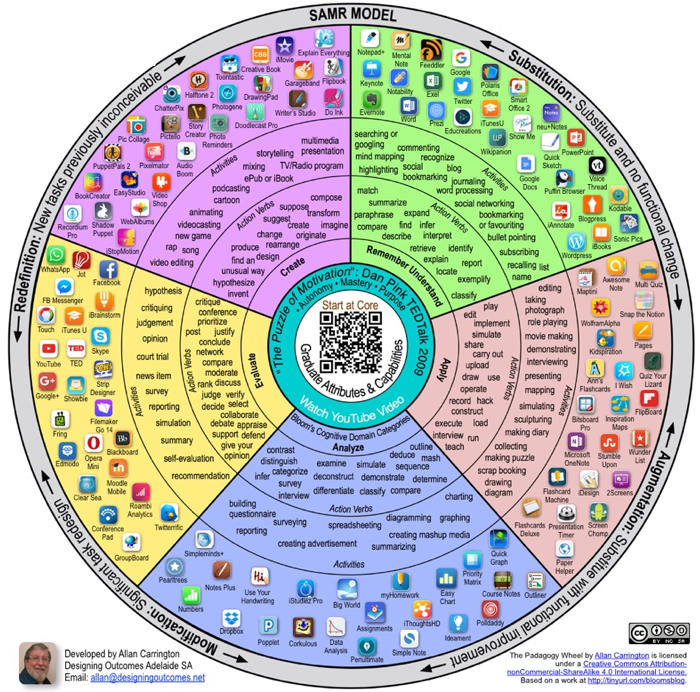
The Padagogy Wheel
A graphical representation of the interface of mobile apps with Bloom’s Cognitive Domain Categories and the SAMR Model of technology integration. The Padagogy Wheel, developed by Allan Carrington of Designing Outcomes in Adelaide, Australia, is a graphical representation of the interface of mobile apps with Bloom’s Cognitive Domain Categories and the SAMR Model of technology integration. Consider more…
-
7 Things You should Know about Gamification – EDUCAUSE Learning Initiative (ELI)
An article that describes the ins and outs of Gamification: the application of game elements in non-gaming situations, often to motivate or influence behavior, published by the EDUCAUSE Learning Initiative (ELI) as part of the 7 Things You Should Know Collection. The 7 Things You Should Know About… series from the EDUCAUSE Learning Initiative (ELI) provides concise information on…
-

Kahoot
Kahoot! is a free online game-based learning resource where you can create quizzes that brings engagement and entertainment to players. It may be used at school, at work, and at home. You can add videos, images, and diagrams to your questions to amplify engagement. Kahoot allows you to create group based multiple choice questions with…
-

ProProfs
ProProfs’ delightfully smart tools are used by millions of users each month. The site hosts more than 1,000,000 pages of content in 70+ languages and is a leading platform for online training and assessment with the world’s largest library of professional tests & quizzes. ProProfs products, including Quiz, Survey, Learning Management System, Knowledge Base, Chat,…
-

Wheel Decide
Wheel Decide provides a free spinner tool intended for decision-making, games, raffles, prize giveaways, and other miscellaneous uses. Enter your values and the Wheel Decide will randomly select from the options provided. Wheel Decide 5 Ways to Use “Wheel Decide” – This is an article that demonstrated several ways to utilize Wheel Decide,…
-

Quizizz
Quizizz is a game-based classroom response system you can play on any device with a web browser! Quiz creation is simple, enabling you to use your own images and text, or even reuse public quizzes. Students can answer at their own pace and watch their data appear on the main screen from where the quiz…
-

FlipQuiz
FlipQuiz provides educators with a quick way to create your own gameshow-style boards for test reviews in the classroom. With FlipQuiz, questions are displayed on-screen and boards are saved for later use. Combined with a beautiful board, students are more likely to be interested and stay engaged with the test review process. FlipQuiz …
-

Ten Basic Rules of Netiquette or Internet Etiquette
The rules of etiquette are just as important in cyberspace as they are in the real world — and the evidence of poor netiquette can stick around to haunt you for much longer. Following these basic rules of netiquette, to avoid damaging your online and offline relationships. Ten Basic Rules of Netiquette or Internet…
-
Google Alerts
You can get emails when new results for a topic show up in Google Search. For example, you can get info about news, products, or mentions of your name. This Google support page below provides clear instructions. Google Alerts Five Creative Uses for Google Alerts – Discussion of the power of Google Alerts…
-

PortfolioGen
Developed by teachers, PortfolioGen allows users to easily create a web-based portfolio and display their skills beyond conventional paper-based binders. Users can share their portfolios with prospective employers, principals, professors, and colleagues. PortfolioGen is for teachers, educators, students, and anyone else who desires a simple way to create their own customized portfolio website. Thousands of…
-

Digication
Digication is a leading provider of ePortfolio and assessment management systems. Digication develops its platform with students, faculty, programs, and institutions’ needs in mind, and enables institutions to close the loop that links student learning to institutional assessment and reporting. Digication Digication Tutorials Getting Started with New Digication video tutorials introduce many of…
-

FolioSpaces
FolioSpaces, powered by “Mahara”, enables you to create an online portfolio. It was developed by faculty at the University of Ballarat, AU. It is a fully-featured electronic portfolio, weblog, resume builder and social networking system, connecting users and creating online communities. You do this by assembling a selection of your resume (curriculum vitae/CV), files, journals,…
-

Zoom
Zoom is a video conferencing and web conferencing service that provides video, phone, and chat services. The basic package is free and hosts up to 100 participants, and an unlimited number of meetings. The basic package includes video conferencing, web conferencing, and group collaboration features such as polling and whiteboards. ZOOM has been noted to…
-

Strikingly
Create a beautiful website for you & your business, in minutes. Zero code or design skills required. You can also convert a LinkedIn profile to a personal website in just a few clicks. Add a Blog section to any of your sites to start blogging right away. A separate page is created for each blog post. Strikingly Discover Strikingly…